PTZ cameras have become essential tools for modern livestreaming. Whether you’re broadcasting from a studio, hosting webinars, capturing hybrid lessons, streaming events in a house of worship, or recording conferences, PTZ technology provides professional video quality with minimal manpower. Yet anyone exploring PTZ cameras for the first time quickly discovers that the options can feel overwhelming.
Zoom levels, HDMI, SDI, NDI, USB, Full HD, 4K. Each specification seems important, but not always in a clear way.
This guide is designed to cut through the confusion. Instead of a loose collection of specs, you’ll get a clear, structured explanation of what each feature means, why it matters, and, most importantly, which combination best fits your specific environment. No technical degree required.
Why PTZ Cameras Have Become So Popular
PTZ stands for Pan-Tilt-Zoom. These cameras move smoothly in all directions and can zoom optically without losing quality. Even better: they do all of this remotely. One operator can control multiple cameras at the same time, store presets, and switch between angles in seconds.
That’s why PTZ cameras are now used in houses of worship, meeting rooms, schools, universities, event halls, livestream studios, sports facilities, and corporate environments. But choosing the right model starts with understanding the differences between them.
And the first major difference is the optical zoom.
Zoom Explained: The Real Meaning of 12x, 20x and 30x
The zoom level determines how far the camera can magnify the image without losing quality. But it’s about more than the number, it’s about what you can realistically film from your mounting position.
A 12x optical zoom is ideal for small to medium-sized rooms where the camera is relatively close to the subject. Think of meeting rooms, classrooms, podcast studios, or small broadcasting spaces. A 12x camera can still provide a sharp close-up of someone standing around 8–10 meters away, while offering a wide enough angle for group shots.
A 20x zoom is the most versatile option for medium to large rooms. This is typically the sweet spot for houses of worship, event spaces, assembly halls, and auditoriums. From 15–25 meters away, a 20x lens can still deliver clear facial close-ups while maintaining smooth, natural framing.
For large houses of worship, sports halls, large auditoriums, or venues where the camera is positioned far from the stage or speaker, 30x zoom becomes essential. At 30–40 meters away, a 30x camera can still frame tight shots with precision, something lower zoom levels simply cannot achieve without compromising quality.
The rule of thumb is straightforward: The larger the room, the higher the required optical zoom.
Connectivity: HDMI, SDI, USB, and NDI Explained in Real-World Terms
Zoom determines what you can capture, but connectivity determines how you deliver the video to your system. The type of output you choose strongly affects reliability, cable distance, workflow, and overall flexibility.
Many beginners naturally start with HDMI because it’s familiar. HDMI delivers excellent image quality, but it has one key limitation: distance. Beyond 10–15 meters, HDMI cables become unstable or require expensive boosters. For smaller setups, like home studios or tight AV rooms, HDMI works perfectly. But for larger environments, it quickly becomes restrictive.
This is where SDI (Serial Digital Interface) takes over. SDI is the broadcasting industry standard because it is extremely stable, supports very long cable runs, and is resistant to electrical interference. Houses of worship, event halls, and production companies rely on SDI simply because it doesn’t fail. When reliability matters, SDI is often the safest choice.
USB-UVC serves a different need: turning your PTZ camera into a plug-and-play webcam. This is ideal for hybrid meetings, educational environments, Teams/Zoom sessions, and corporate conferencing setups. No capture card needed. Your computer recognizes the camera instantly. USB, however, has the shortest cable limitations of all connection types.
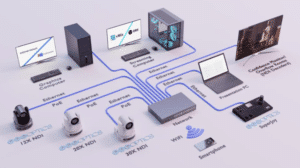
Finally, there is IP video, with NDI as the most popular protocol. NDI sends video, audio, control data, and power (with the right switch) all through a single network cable. This transforms the entire workflow. You can place cameras anywhere in the building, control them through the network, and pull the video feed directly into software such as vMix, OBS, Livestream Studio, or Wirecast. Larger houses of worship, multi-camera studios, and professional productions increasingly prefer NDI because of its flexibility and simplicity.
NDI does require a solid network, preferably a managed switch, but once implemented, it’s the most scalable and modern solution available.
Resolution: Do You Really Need 4K?
Resolution is one of the most misunderstood aspects of PTZ cameras. Many assume 4K is the obvious choice, but the truth is more nuanced.
1080p (Full HD) is still more than enough for the vast majority of livestreams. Platforms like YouTube and Facebook compress video heavily, so the difference between 1080p and 4K becomes less noticeable in live environments. If your goal is basic livestreaming, Full HD remains a strong and cost-effective option.
However, 4K offers undeniable advantages:
- finer color detail,
- better performance in post-production,
- the ability to crop or digitally zoom without losing quality,
- improved clarity on LED walls or large displays,
- and future-proofing for long-term use.
Even when streaming in 1080p, a 4K sensor often produces a cleaner, sharper, more dynamic image due to better image processing.
So the question is not whether 4K is “worth it,” but whether your application benefits from its added flexibility.
Camera Control: The Heart of the PTZ Workflow
The way you control your PTZ camera is just as important as the hardware itself. Many cameras include an infrared remote, but this is rarely used in professional setups.
Serious workflows rely on:
- a dedicated joystick controller,
- a web interface for fine-tuning settings,
- NDI or IP-based control from software like vMix, OBS, or Companion,
- or automation through presets.
A joystick controller is especially valuable in houses of worship and event settings, where operators need quick, precise control and rapid transitions between multiple angles. With VISCA-over-IP and NDI, one operator can manage several cameras at once, making PTZ systems both cost-effective and highly efficient.
Matching Specifications to Environments
Every space has unique challenges, and no single PTZ camera fits all scenarios. Still, you can use a few guidelines to find the best match:
- Small to medium rooms → 12x zoom, HDMI or USB
- Medium to large rooms → 20x zoom, SDI or NDI
- Large houses of worship or venues → 30x zoom, SDI or NDI
- Professional studios → 4K with NDI or SDI
If you’re unsure, start by determining the distance between the camera and its main subject. That single measurement influences almost every other decision.
Choosing a PTZ Camera Doesn’t Have to Be Complicated
When you break the process down into three simple questions, everything becomes clearer:
- How far will the camera be from the subject?
- How do I want to connect the camera to my system?
- How do I want to control it?
Once you answer those questions, the right specification set becomes obvious. Whether you’re installing a system in a house of worship, a school, a studio, a conference hall, or a corporate environment.
Looking for complete ready-made setups?
If you want inspiration, we’ve created a dedicated page with single-camera, dual-camera, and multi-camera setups, tailored for different environments, https://movisionpro.com/streaming-setups/.